On this page
- How we compared these restaurant POS systems
- The best POS system for restaurants in 2026, by use case
- How much does a restaurant POS system cost in 2026?
- How do I choose a POS system for my restaurant?
- Which POS features actually matter in 2026?
- What changes for restaurant POS in the UAE?
- Frequently Asked Questions
- Choose the till that matches how you serve
The best POS system for restaurants in 2026 depends on how you serve: Square for Restaurants is the strongest free starting point for counter service, Toast leads US full service, Lightspeed Restaurant wins on inventory depth, TouchBistro keeps iPad table service simple, Clover offers the most hardware flexibility, and for the UAE and wider Gulf the shortlist comes down to Quickbuy or Foodics.
This comparison looks at all seven the way an operator would: what the software really costs once the add-ons land, what the payments line does to your margin, how painful the hardware is to replace, and what leaving looks like. If you first want the basics of what a POS covers, our restaurant POS system guide walks through the core functions. This piece is about choosing between the real options.
How we compared these restaurant POS systems
Every system here was scored against the same six questions, because the feature grids all look identical until you run a busy Friday on them.
- Total running cost: subscription plus the add-ons a real restaurant ends up needing (online ordering, kitchen display, loyalty), not the advertised entry price.
- Payments: the processing rate band, and whether you may bring your own processor at all.
- Hardware: what you must buy, what you can reuse, and what a replacement terminal costs on a Saturday.
- Service fit: counter service, full table service, or ordering-first formats like QR at the table.
- Contract and exit: month to month or multi-year, and what your data export looks like when you go.
- Local fit: VAT invoices, Arabic receipts, local payment habits and support hours if you operate in the Gulf.
The best POS system for restaurants in 2026, by use case
Pricing below reflects published US price bands as of mid 2026 where the vendor publishes any; quote-based and regional pricing is flagged. Every system gets what it is genuinely good at, and at least one honest reason it might not be your pick.
Quickbuy: best for UAE and Gulf independents that want ordering built in
Quickbuy is an ordering-first POS: QR ordering at the table, direct online ordering, the kitchen screen and inventory ship in one subscription instead of as add-ons, which is exactly the stack a Gulf cafe or casual dining room usually bolts together from three vendors. Receipts, menus and VAT invoices come in Arabic and English out of the box, and pricing is published rather than quote-based. The honest limitation: it is built for the UAE and nearby markets, so if your locations are in the US or Europe, the payment rails and support hours favor the players below. What is included is on the restaurant POS software page.
Toast: best US all-in-one for full service
Toast owns the US full service conversation for a reason: handhelds, kitchen screens, payroll and tip management live in one ecosystem, and new servers learn it fast. You pay for that in structure. Processing runs through Toast, the Android hardware is proprietary, and leaving means replacing terminals, not just software. Entry tiers start cheap; a realistic full service setup lands well above the sticker. US only.
Square for Restaurants: best free starting point for counter service
For a cafe or fast casual counter, the free tier is genuinely usable rather than a trial: iPad based, a clean menu builder, flat-rate card processing and no monthly commitment. The trade-off arrives with volume, because flat-rate processing that feels cheap at 30 covers a day quietly becomes your biggest line at 300. Full service depth, think coursing, complex modifiers and floor management, is thinner than Toast or TouchBistro.
Lightspeed Restaurant: best for inventory depth and multi-location menus
Lightspeed earns its place in the back office: ingredient-level inventory, vendor purchasing and multi-location menu and price control that growing groups need. It is a configure-it-properly platform, so budget real setup time, and the total climbs as modules stack. Right-sized for a serious bar program or a three-site group; heavy for a five table cafe.
TouchBistro: best iPad flow for table service
TouchBistro was built by restaurant people and the service flow shows it: seat, course, split and transfer are all fast on iPads, and the local setup keeps taking orders when the internet drops. Online ordering, reservations and loyalty are paid add-ons though, so the attractive entry price grows once you assemble the full stack, and the ecosystem around it is smaller than Toast or Square.
Clover: best hardware flexibility, sold through banks
Clover makes arguably the nicest generic POS hardware around, and you can buy it through dozens of banks and processors. That is also the catch: pricing, contract terms and support quality depend on which reseller sold it to you, not on Clover. Restaurant depth comes from apps rather than a restaurant-native core, so a demanding dining room will feel the seams. Strong for counter service tied to an existing banking relationship.
Foodics: best for Gulf franchises and larger groups
Foodics is the regional heavyweight: deep delivery aggregator integrations, local payment support, Arabic-first design, and it scales into franchise reporting and central kitchens. Pricing is quote-based and modular, so the cost conversation starts with a sales call and grows with each module, and a single-location cafe usually ends up paying for more platform than it uses. For multi-brand Gulf groups it belongs on the shortlist.
How much does a restaurant POS system cost in 2026?
Across the market, restaurant POS pricing has four layers, and the advertised subscription is usually the smallest one:
- Software: 0 to about 165 USD per location per month for core plans. Most independents land between 60 and 110 once a free tier stops fitting.
- Add-ons: online ordering, kitchen display, loyalty and reservations run 20 to 50 USD each per month on platforms that sell them separately. Platforms that bundle them skip this layer entirely.
- Hardware: from nothing (reuse an iPad) to 1,500 USD and up per station for proprietary terminals, plus printers and cash drawers.
- Payments: 1.5 to 3 percent of every card transaction depending on the processor and what you negotiate. At any real volume this line dwarfs the other three.
Read the payments line before the feature grid. We priced a 20 table cafe in Dubai doing about 150,000 AED a month on cards: the gap between 1.6 and 2.9 percent processing came to more than 23,000 AED a year, several times the software subscription. Pick the payment terms first, then argue about features.
If you are weighing a cloud subscription against an older on-premise till, the cost structures differ enough that we broke them down separately in our cloud POS guide.
How do I choose a POS system for my restaurant?
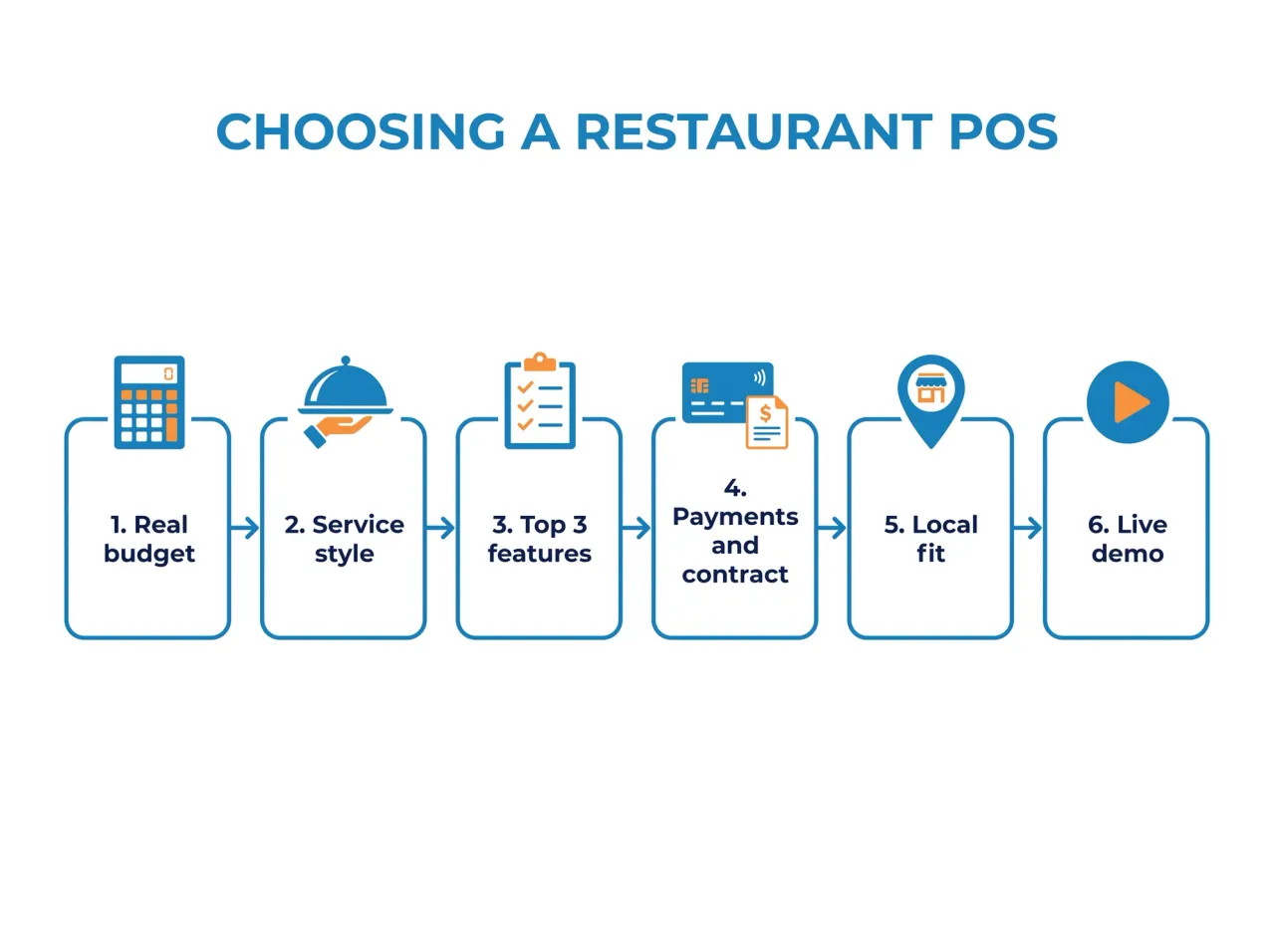
Shortlists beat feature tours. This is the sequence that keeps the decision honest:
- Set the real budget. Software plus add-ons plus hardware plus the payment percentage at your actual card volume. Two numbers matter: month one and month thirteen.
- Name your service style. Counter service, full table service and QR-first casual dining stress completely different parts of a POS.
- List your three non-negotiable features and ignore the rest of the grid. For most rooms it is some mix of offline mode, kitchen routing and built-in ordering.
- Interrogate payments and contract terms: rate, lock-in, exit fees, data export. This is where the expensive surprises live.
- Check local fit: VAT invoicing, receipt languages, payment habits, and whether support answers during your Friday rush rather than their Tuesday morning.
- Run a live demo on your own menu, with your own modifiers and one angry-lunch scenario. Half an hour of that beats every review site.
Which POS features actually matter in 2026?
Feature lists sell software; three or four features run restaurants. The ones that consistently earn their keep:
- Offline mode. Order taking and card queuing that survive a router reboot mid-service.
- Kitchen display. Routing, timers and station views beat printed tickets in any kitchen past ten covers a night; our KDS buyer's guide covers when the upgrade pays off.
- Built-in ordering. QR ordering at the table and direct online ordering should land in the same kitchen queue as the till, so a rush does not become three tablets on the pass.
- Ingredient-level inventory. Stock that depletes on every sale, so food cost shows up daily instead of at the month-end count.
- Reports you will actually read. Daily sales against labor on your phone beats fifty dashboards nobody opens.
What changes for restaurant POS in the UAE?
Gulf operations add requirements that US-built systems treat as afterthoughts. VAT-registered restaurants must issue compliant tax invoices under the UAE Federal Tax Authority's VAT rules, menus and receipts often need clean Arabic and English side by side, and guests pay with everything from contactless wallets to the cash that still covers a real share of tickets.
Support hours matter more than they sound: a US help desk opens at 7pm Dubai time, three hours after your dinner service did. Regional platforms exist because of exactly these gaps; our overview of restaurant tools for the UAE covers the local stack in detail.
Frequently Asked Questions
How do I choose a POS system for my restaurant?
Budget first, including payments at your actual card volume, then service style, then a three-feature shortlist, then contract terms, then a live demo on your own menu. The six steps above expand each stage. If two systems tie after the demo, pick the one that is easier to leave.
What POS do most restaurants use?
There is no single worldwide leader. In the US, Toast and Square report the largest restaurant install bases, with Clover common through bank relationships. In the UAE and wider Gulf, regional platforms like Quickbuy and Foodics are the usual picks because of Arabic support, VAT invoicing and local delivery integrations.
How much does a restaurant POS cost per month?
Plan on 0 to about 165 USD per location for core software, with most independents landing between 60 and 110. Add-ons can put another 20 to 50 USD each on top, and card processing of 1.5 to 3 percent usually outweighs all of it. Always price month thirteen, not month one.
Can I keep my own payment processor?
Depends on the platform. Some lock processing to their own rails, Toast and Square among them, while others let you bring a processor or use local rails. If you already hold a strong negotiated rate, that one answer can eliminate half your shortlist before any demo.
Do cloud POS systems work without internet?
Good ones keep serving through an outage: orders keep reaching the kitchen, cards queue and settle once the connection returns. Implementations differ by vendor, so test the exact failure in your demo: pull the router cable mid-order and watch what happens.
How long does switching POS systems take?
For a single location, menu build and staff training take one to two weeks of part-time effort, and most teams cut over on a quiet Monday after a weekend of parallel running. The long pole is data: export your products, recipes and customer list before you sign anything new.
Choose the till that matches how you serve
If you run counter service in Kansas, start with Square. Full service in Chicago, demo Toast against TouchBistro. An inventory-heavy group, put Lightspeed on the list. The best POS system for a restaurant is the one whose trade-offs you chose on purpose.
And if you run a restaurant in the UAE or the Gulf and want the till, QR ordering, kitchen screen and inventory to arrive as one system instead of four invoices, that is the gap Quickbuy was built for. See plans and pricing, or book a fifteen minute demo on your own menu.