In a busy restaurant, every order is ultimately won or lost in the kitchen. The front of house can take orders flawlessly and your food can be excellent, but if tickets pile up, get lost, or come out of sequence, guests wait too long and the whole service unravels. For decades the answer was paper chits, a spike rail, and an expediter shouting over the noise - a workflow that breaks down the moment volume spikes or online orders start landing alongside dine-in.
A kitchen display system (KDS) replaces that paper-and-shouting routine with smart digital screens that receive, route, time, and track every order in real time. This guide explains what a KDS is, how it works, the benefits and features that matter most, how to choose one for your service model, and what it costs in 2026 - so you can decide whether it belongs in your kitchen and which solution fits.
What Is a Kitchen Display System (KDS)?
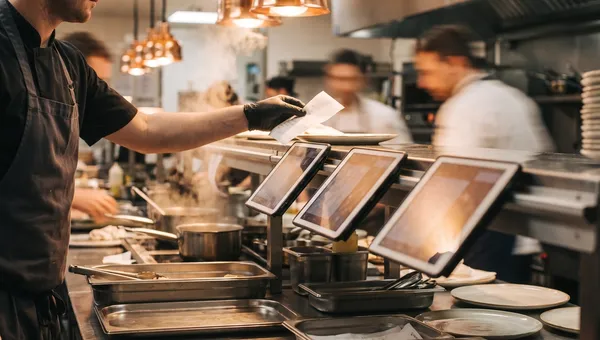
A kitchen display system is a digital screen - or set of screens - at your kitchen stations that shows incoming orders the moment they're placed. Instead of printing a paper ticket, your point-of-sale (POS) and online-ordering channels send each order straight to the right screen: starters to the cold station, mains to the grill, drinks to the bar. Cooks see exactly what to make, in what order, with every modifier and allergy note attached, and "bump" each ticket off the screen as it's completed.
Because a KDS is software rather than paper, it does things a printer never could: color-code tickets that are running late, keep a live count of how many of each item are in the queue, fire courses on cue, and record exactly how long every ticket took. That data turns the kitchen from a black box into something you can measure and steadily improve.
KDS vs. kitchen printers
Traditional kitchen printers are cheap and familiar, but they're one-way and dumb: a chit prints, and that's it. There's no timer, no priority, no record, and no clean way to handle a modified or cancelled order beyond crossing it out by hand. Paper jams, ink runs out, and tickets blow off the rail or stick together during a rush. A KDS removes the consumables entirely, updates instantly when an order changes, and never loses a ticket - while capturing the timing and accuracy data printers simply can't.
Where a KDS fits in your restaurant tech stack
Picture three layers working together: your POS and online-ordering channels capture demand, the KDS coordinates production, and your reporting tools measure the result. The KDS sits in the middle as the kitchen's operating system. That's why integration matters so much - a KDS natively connected to your POS, QR-code menu, and delivery orders shows everything on one screen, while a bolt-on that only sees dine-in tickets leaves your team juggling tablets again.
How a Kitchen Display System Works
Whatever the brand, most kitchen display systems follow the same lifecycle for every order:
- Capture - a server rings in an order at the POS, or a guest orders via QR menu, app, or delivery marketplace.
- Route - the system splits the order by station and sends each item to the correct screen automatically.
- Prioritize - tickets are sequenced and timed, with on-screen color cues when one is nearing or past its target time.
- Prepare - cooks work the items and mark them ready, and the expediter sees when a full table is good to go.
- Bump - completed tickets clear from the screen with a tap or bump bar, optionally notifying the front of house or the guest.
- Measure - every ticket time and item is logged for reporting on speed, volume, and bottlenecks.
The result is a kitchen that stays in sync without anyone shouting. New orders appear instantly, late ones stand out, and nothing slips through the cracks - even when dine-in, takeaway, and delivery all hit at once.
Key Benefits of a Restaurant KDS
Faster ticket times and higher throughput
By routing items to the right station automatically and surfacing the most urgent tickets first, a KDS cuts the dead time between an order landing and a cook starting it. During peak service that saved time compounds - more covers per hour, shorter waits, and a line that keeps moving instead of backing up.
Fewer errors and remakes
Handwriting, smudged thermal paper, and verbal relays are a major source of kitchen mistakes. A KDS shows each order exactly as it was entered, with modifiers and allergens clearly flagged, so the line makes the right dish the first time. Fewer remakes means less wasted food, lower costs, and fewer comped meals.
Better coordination across stations
Coursing, all-day item counts, and a shared expo view keep every station pulling in the same direction. The grill knows there are eight steaks working across four tables, the expediter can fire mains the moment starters clear, and one screen shows whether a table's full order is ready to run. That coordination is what keeps food hot and tables turning.
Real-time visibility and reporting
Because every ticket is timed, you finally get hard numbers on kitchen performance: average ticket time by daypart, your slowest stations, and which menu items drag down speed. Managers can catch a bottleneck mid-shift and fix it, then use the history to staff and engineer the menu more intelligently.
Must-Have KDS Features: A 2026 Checklist
Not every kitchen display system is created equal. As you compare options, make sure your shortlist covers these essentials:
- Automatic order routing - items split to the correct station with no manual sorting.
- Color-coded timers and SLAs - visual cues for tickets nearing or past their target time.
- All-day and item counts - a live tally of everything in the queue for prep and par decisions.
- Course firing and coursing - hold and fire courses so dishes land in the right sequence.
- Online-ordering and delivery integration - QR-menu, app, and marketplace orders on the same screen as dine-in.
- Modifier and allergen display - special requests and allergies shown clearly on every ticket.
- Recall and bump history - pull back a bumped ticket instantly when a question comes up.
- Prep-time analytics - per-ticket and per-item timing you can actually report on.
- Offline resilience - the kitchen keeps running if the internet briefly drops.
- Multi-station and multi-location support - scale from one screen to a whole group.
KDS Hardware: Screens, Bump Bars, and Setup
Most modern systems are software-first and run on hardware you can buy off the shelf, which keeps costs down. Commercial-grade displays or sturdy tablets are mounted at each station, ideally with a heat- and grease-resistant rating for the line. Many kitchens add a physical bump bar - a row of durable buttons - so cooks can clear tickets without touching a greasy screen. Plan for secure mounting at eye level, splash protection near wet or hot stations, and a reliable network connection; a system with a true offline mode protects you if the Wi-Fi hiccups mid-rush.
How to Choose the Right KDS for Your Restaurant
Match it to your service model
A quick-service counter, a full-service restaurant, and a delivery-only cloud kitchen have very different needs. QSR and cloud kitchens prize raw speed, order routing, and tight delivery integration; full-service venues lean harder on coursing, expo coordination, and table-level firing. Choose a system whose defaults match how you actually run service, not one built for a different format.
Insist on native online-ordering integration
In 2026 a large share of orders arrive through QR menus, apps, and delivery platforms. If your KDS isn't natively connected to those channels, someone has to re-key online orders by hand - exactly the errors and delays a KDS is meant to eliminate. The cleanest setups come from platforms where ordering, POS, and the kitchen display are parts of one product, so every order reaches the line automatically. Quickbuy is built this way: dine-in QR orders, online orders, and delivery all flow straight to the kitchen screen with no separate integration to maintain.
Add up the total cost of ownership
Look past the headline price. Total cost of ownership includes hardware, the monthly software fee per screen, setup and training, and any per-order or transaction fees your provider charges. An all-in-one platform that bundles ordering, POS, and KDS for a flat fee is often far cheaper over a year than stitching together separate tools that each take a cut.
Demand reliability and offline resilience
Your kitchen can't stop because a server went down. Favor a KDS with a proven offline mode that keeps displaying and bumping tickets through a brief outage and syncs automatically once the connection returns. Ask about uptime, support hours, and how updates are rolled out before you commit.
How Much Does a Kitchen Display System Cost in 2026?
Pricing varies with your setup, but it breaks into two buckets. Hardware is a one-time cost - a commercial display or rugged tablet plus an optional bump bar and mount, typically a few hundred dollars per station. Software is usually a recurring fee per screen per month, and the range is wide depending on whether the KDS is a standalone add-on or part of a broader platform. Bundled solutions that include online ordering, POS, and the kitchen display under one subscription tend to deliver the lowest total cost, because you're not paying separately for each layer or losing margin to per-order commissions. For numbers tailored to your stations and locations, check Quickbuy's pricing page.
Frequently Asked Questions
What's the difference between a KDS and a POS?
A POS (point-of-sale) is where orders and payments are taken; a KDS (kitchen display system) is where those orders are shown to the kitchen and managed through production. They work as a pair - the POS and online channels capture the order, and the KDS coordinates how it's made and timed. In an all-in-one platform, both run off the same system, so orders flow from the POS or QR menu to the kitchen screen automatically.
Do I need a KDS for a small restaurant or cloud kitchen?
Even small kitchens benefit, and cloud kitchens especially. If you take online or delivery orders at all, a KDS removes manual re-keying and keeps every channel on one screen - which matters most in a delivery-only operation where there's no dining room to absorb mistakes. Many operators start with a single screen and expand as they grow.
Can a KDS handle online and delivery orders?
A good one can, and should. The biggest advantage of a modern KDS over paper tickets is consolidating dine-in, QR-menu, app, and delivery-marketplace orders onto one display so the kitchen works a single unified queue. This is exactly where native integration between your ordering channels and the KDS pays off.
Does a kitchen display system work offline?
Quality systems include an offline mode that keeps showing and bumping tickets during a short network outage, then syncs the data once you're back online. Always confirm offline behavior before buying - it's the difference between a hiccup and a stalled service.
How long does it take to set up a KDS?
If you use a platform where ordering, POS, and KDS are already integrated, setup can take as little as an afternoon: mount the screens, map your menu items to stations, and train the team. Standalone systems that require wiring together separate POS and ordering tools take longer and more configuration.
Bring Your Kitchen Online with Quickbuy
A kitchen display system is one of the highest-leverage upgrades a restaurant can make - faster tickets, fewer mistakes, and real data on how your kitchen performs. The biggest wins come when your ordering, POS, and kitchen screen are one connected system instead of separate tools bolted together. Quickbuy brings QR-code dine-in ordering, online and delivery orders, POS, and kitchen management into a single commission-free platform, so every order lands on the right screen automatically and your team spends less time juggling channels and more time cooking. Explore Quickbuy's plans on the pricing page and see how a connected kitchen could speed up your next service.