On this page
- What does restaurant inventory software actually do?
- Do you need software, or will a spreadsheet do?
- How much does restaurant inventory software cost?
- Which features actually matter?
- What does it actually save you?
- How do you choose restaurant inventory software?
- How do you roll it out without losing a week?
- Frequently Asked Questions
- Start with the number you are missing
Restaurant inventory software costs roughly 0 to 300 USD per location per month, and it earns that back by showing you the gap between the stock you should have and the stock you actually have. Most independents pay between 50 and 150 once they outgrow a spreadsheet, and the cheapest useful option is often the inventory module already sitting unused inside their POS.
This is a buying guide, not a how to. It covers what the software does, when a spreadsheet is genuinely still fine, what the tiers cost, which features earn their keep, and how to run a selection without losing a week of service. If you want the counting process itself, cycle counts, par levels and the rest, that lives in our complete guide to restaurant inventory management.
What does restaurant inventory software actually do?
Strip away the marketing and there are four jobs. Everything else is packaging.
- It holds your item list and recipes, so the system knows a burger consumes 160 grams of beef, a bun, and a slice of cheese.
- It depletes stock as you sell, turning every till transaction into a deduction against theoretical stock levels.
- It compares theory against your physical count, which is the only number that matters. That variance is where waste, over-portioning and theft show up.
- It reorders, either by flagging items below par or by generating the purchase order for you to approve.
Notice that the software does not reduce your costs on its own. It makes the leak visible and puts a number on it. What you do about the number is still a management job, which is why the rollout matters as much as the choice.
Do you need software, or will a spreadsheet do?
Plenty of restaurants buy a platform they are too small to use. Three honest tiers:
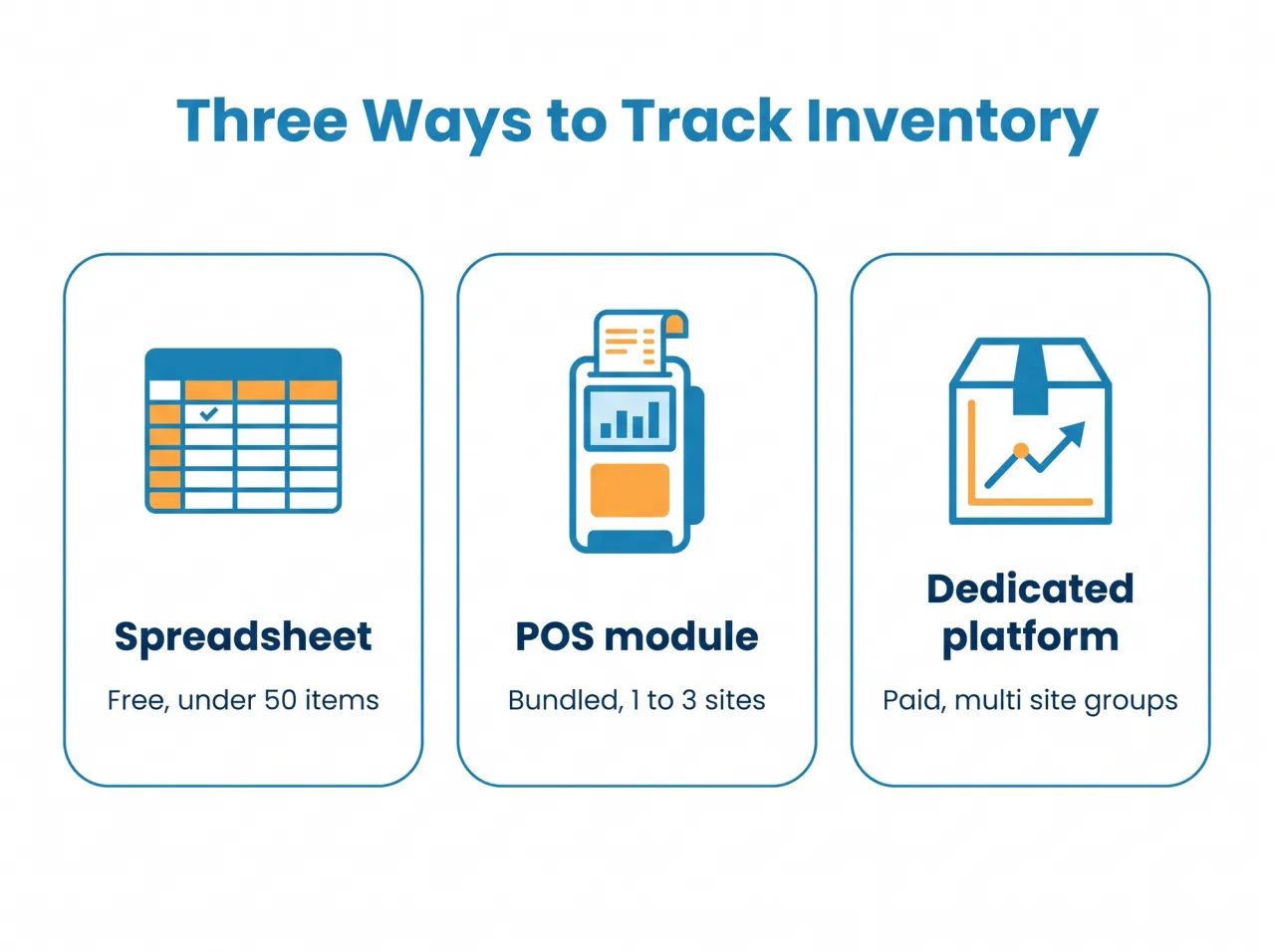
A spreadsheet, if you are under 50 items
If you hold under 50 tracked items and count weekly, a spreadsheet genuinely works. It is free, everyone can edit it, and the discipline of counting matters far more than the tool. The moment it breaks is when two people edit different copies, or when you want yesterday's variance without spending an evening on it.
Your POS inventory module, for 1 to 3 sites
This is the tier most restaurants should try first, and the one they most often ignore. If your till already offers stock tracking, the depletion is automatic and the data is already in one place. Coverage is shallower than a dedicated tool, and multi location purchasing is usually weak, but it is frequently bundled at no extra cost. Check what your current system includes before you buy anything: our POS comparison notes which platforms treat stock as a real feature rather than a checkbox.
A dedicated platform, for groups and heavy prep
Once you run multiple sites, a central kitchen, or a bar programme with hundreds of SKUs, a dedicated tool pays for itself in purchasing control alone: vendor price tracking, transfers between locations, and recipe costing that updates when a supplier moves a price. At that scale you are also close to the territory covered in our restaurant ERP buyer's guide, and the two categories overlap more than either vendor will admit.
How much does restaurant inventory software cost?
Four layers, and the subscription is rarely the biggest one:
- Spreadsheet: free, plus whatever your time is worth on count night.
- POS inventory module: 0 to 50 USD per location per month, and often already included in the plan you pay for.
- Dedicated platform: 100 to 300 USD per location per month, more with vendor integrations or multi site purchasing.
- Setup and onboarding: 0 to 1,000 USD once. Building the item list and recipes is the real cost here, and it is measured in hours, not licence fees.
Hardware is usually trivial: a tablet you already own, and optionally a barcode scanner at 50 to 200 USD. Be more suspicious of per user pricing than per location pricing, because inventory is a job that several people touch and per seat fees punish exactly the behaviour you want.
Which features actually matter?
Ignore the feature grid and check these, in this order:
- Recipe level depletion. Without it you are tracking purchases, not usage, and you will never see a true variance.
- A count workflow that works on a phone, offline, in a cold room. If counting is painful nobody does it, and uncounted software is worthless.
- Variance reporting you can read in a minute, ranked worst item first rather than a 300 row export.
- Automated reordering against par levels, ideally generating a purchase order you approve rather than sending one by itself.
- Supplier price history, so you find out a case of chicken went up 8 percent before the month end, not after.
- POS integration that already exists, not one promised on a roadmap. This is the single most common regret in this category.
Multi location groups should add transfers and central purchasing to that list; a good inventory management for restaurants setup treats a transfer between sites as a movement rather than a sale, which sounds obvious and is frequently wrong in practice.
What does it actually save you?
Be sceptical of vendor ROI calculators. The saving is real, but it comes from finding variance, not from the software doing anything clever.
We put counts on a tablet in a Dubai kitchen and the first month showed a 3 percent gap between theoretical and actual usage on about 60,000 AED of food spend. That is 1,800 AED a month, close to 21,600 a year, walking out through over portioning and one supplier who kept delivering short. The software did not fix any of it. It just made the gap visible enough that we could argue about it with numbers instead of opinions.
Two honest caveats. The first month usually looks worse, not better, because you are finally measuring something you were guessing at. And the saving decays if counts stop: this is the one software category where the tool genuinely stops working when the habit stops. If your food cost percentage is the number you are chasing, our food cost guide covers the calculation that sits on top of this data.
How do you choose restaurant inventory software?
Five steps, in order:
- Count your tracked items honestly. Under 50 and weekly counts, stay on a spreadsheet a while longer.
- Check what your POS already includes. A bundled module you already pay for beats a better tool you have to integrate.
- Demand a demo on your own top twenty items, with your recipes and your supplier units. Case size versus portion unit is where these systems fall apart, and a generic demo hides it.
- Ask exactly how the POS integration works: native, via a documented API, or a nightly file. The last one is not an integration.
- Price the whole first year, subscription plus onboarding plus the hours to build recipes. Then decide whether the variance you expect to find covers it.
How do you roll it out without losing a week?
Most failed implementations fail the same way: someone tries to build 800 items before going live, loses momentum around item 300, and the project quietly dies.
- Start with your top 30 items by spend. They are most of your food cost and a fraction of the work.
- Count the same day every week, before service, same two people. Consistency beats precision early on.
- Accept a messy first month. You are calibrating, not reporting.
- Add items only when the current list is being counted reliably, and connect food management and purchasing once the counting habit holds.
Frequently Asked Questions
What does restaurant inventory software do?
It stores your items and recipes, depletes stock automatically as you sell, compares that theoretical figure against your physical count to produce a variance, and reorders against par levels. The variance is the point: it is the number that tells you where food is disappearing.
How much does inventory software cost for a restaurant?
Plan on 0 to 50 USD per location per month for a POS bundled module, or 100 to 300 for a dedicated platform, plus up to 1,000 USD once for onboarding. Most single site independents land between 50 and 150 per month in total.
Can inventory software automate reordering?
Yes. Most systems generate a purchase order when stock falls below a par level, and better ones account for supplier lead times and case sizes. Keep a human approval step: automated ordering with a wrong par level will cheerfully buy you a pallet of something you do not need.
Do I need software or is a spreadsheet enough?
A spreadsheet is genuinely enough under about 50 tracked items with weekly counts. Move up when several people need to edit it, when you want variance without manual work, or when you open a second site and transfers between them start to matter.
Does it integrate with my POS?
It depends, and this is the question that decides most purchases. Native integration is best, a documented API is workable, and a nightly file export is not really an integration. Confirm it works with your exact POS version before signing anything.
How long does implementation take?
Two to four weeks of part time work for a single site, and the item and recipe build is nearly all of it. Starting with your top 30 items by spend gets you a usable variance report in the first week rather than the second month.
Start with the number you are missing
The best inventory system is the one your team will actually count into every week. For most single site restaurants that means using the module in the POS you already own; for groups it means a dedicated tool with real purchasing control. Either way, the software only ever hands you a variance. The margin comes from what you do next.
Quickbuy includes recipe level stock tracking in the same subscription as the till and the kitchen screen, so depletion happens without a second integration to maintain. See plans and pricing, or book a short demo on your own item list.