On this page
- What is restaurant purchasing software?
- Why do restaurants overbuy from suppliers?
- How much should a restaurant order?
- How does restaurant purchasing software work?
- How do you check deliveries and supplier bills?
- Restaurant purchasing in the UAE
- What should you look for in restaurant purchasing software?
- Frequently Asked Questions
- Stop guessing your supplier orders
Restaurant purchasing software turns what your kitchen actually used into supplier orders, so you reorder what you burned through instead of guessing. It drafts the purchase order, a manager approves it, and the same record is used to check the delivery and the supplier's bill. The point isn't ordering faster. It's ordering the right amount.
Overbuying rarely looks like a problem on the day. It shows up later as a walk-in full of prep nobody needs, cash tied up in stock, and produce in the bin at the end of the week. This guide covers why restaurants overbuy, how to decide how much to order, how purchasing software works from day close to paid bill, and what to look for before you choose one.
What is restaurant purchasing software?
It's the part of your back office that handles buying from suppliers: what to order, from whom, at what price, and whether you got what you paid for. At its simplest it's a place to raise purchase orders. The useful versions connect that order to your recipes and stock, so the quantities come from real usage, deliveries update inventory at the price you paid, and the supplier's bill is checked against both.
It sits between two things you probably already track. Restaurant inventory software tells you what's on the shelf; purchasing decides what comes through the back door next. When the two are separate, someone copies numbers from one to the other every morning, and that's where the overbuying starts.
Why do restaurants overbuy from suppliers?
Almost never because someone is careless. Usually it's one of these:
- Ordering from memory. The chef orders what felt short last time, not what was used, and a slow Tuesday gets ordered like a busy Friday.
- Safety stock that only grows. Nobody gets blamed for having too much, so every buffer creeps up and never comes back down.
- Case sizes. The supplier sells a 5 kg box, the recipe needs 1.2 kg a day, and the gap sits in the walk-in until it spoils.
- No link between menu changes and orders. A dish comes off the menu but its ingredients keep arriving for another two weeks.
- Deliveries nobody checks. Short or substandard deliveries get signed for, the kitchen reorders to cover the gap, and the bill is paid in full.
It adds up. The UN Environment Programme's Food Waste Index Report 2024 estimates that 1.05 billion tonnes of food were wasted in 2022, with 28% of it coming from food service. Not all of that starts at the supplier order, but a lot of what ends in a restaurant bin was bought too early or in too large a quantity.
How much should a restaurant order?
There are two honest ways to set order quantities, and most kitchens end up using both.
Par levels
A par level is the amount you want on hand before the next delivery. You count what's left, subtract it from par, and order the difference. It's simple and it works well for dry goods and anything with a long shelf life. Its weakness is that pars go stale: set them in the busy season and you overbuy all summer.
Replace what you used
The other approach starts from sales. Every dish sold uses a known amount of each ingredient, so a day's orders tell you exactly what the kitchen consumed. Reorder that, plus anything you still owe yourself from yesterday, and stock stays level without anyone counting by hand. It depends on accurate recipes, which is one more reason to keep your food cost percentage honest: the same recipe data drives both.
In practice, use sales-based ordering for fresh, fast-moving ingredients and pars for the slow shelf, and review both whenever the menu changes.
How does restaurant purchasing software work?
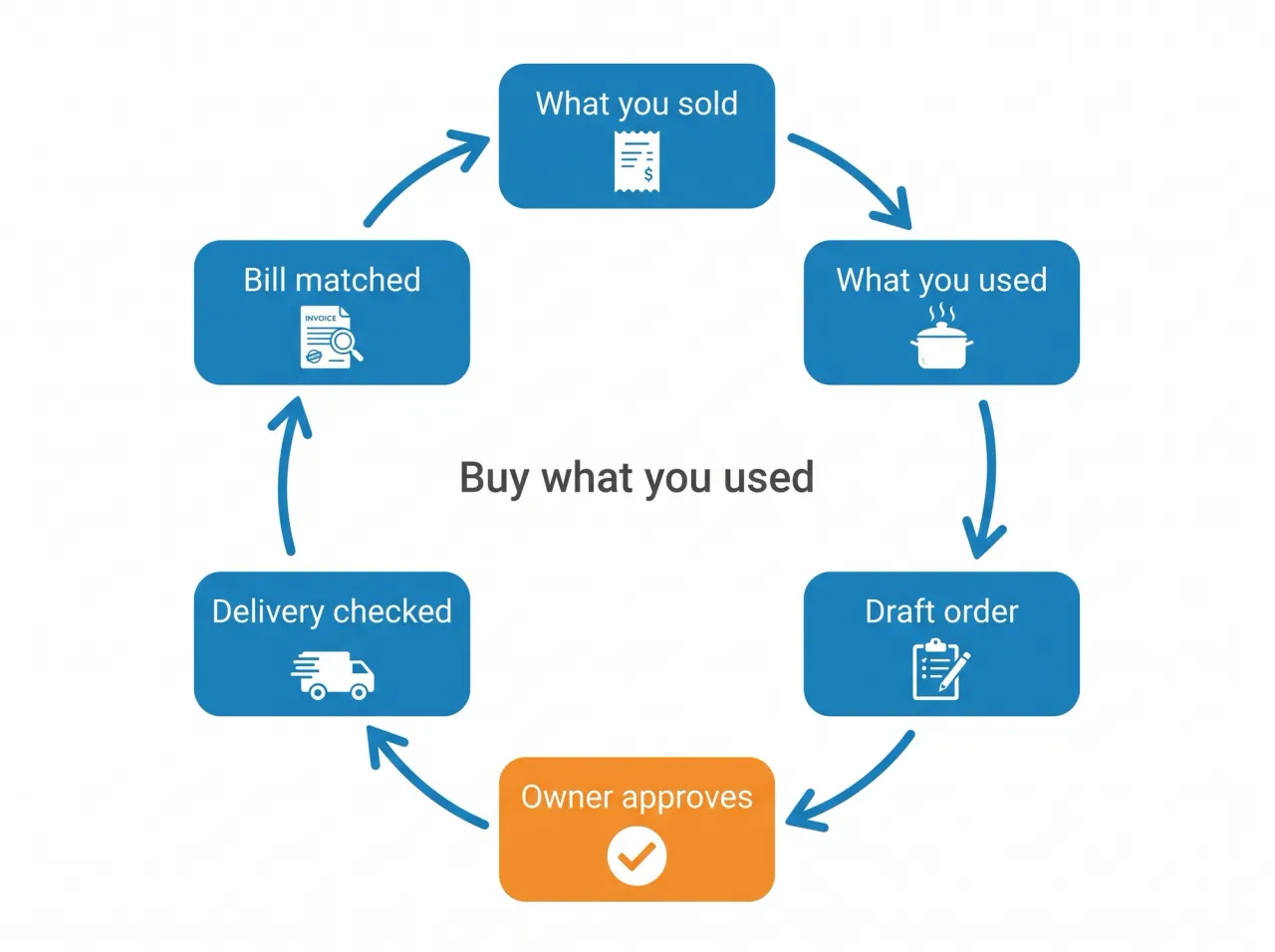
A good system runs as a loop that closes every day. Here's how it works in Quickbuy, step by step:
- At day close, the system adds up what the kitchen used, based on the recipes of every order that was settled that day, and carries forward anything from the previous list that hasn't been ordered yet.
- The owner turns that list into draft purchase orders in one step, grouped by each ingredient's preferred supplier and rounded up to the supplier's whole packs, so 1.2 kg of a 5 kg item becomes one box, not a fraction.
- Each draft is reviewed and approved by the owner or a manager you've given approval rights. Nothing goes to a supplier on its own.
- The approved order is sent to the supplier by email, with a link to the purchase order.
- When the delivery arrives, staff record what was received against what was ordered, and reject anything short or substandard with a reason.
- The supplier's bill is recorded against the same purchase order, VAT included, and paid from accounts payable.
Received goods go into stock as a batch at the price on the purchase order, converted from the supplier's pack into your stock unit, and the kitchen draws them down first in, first out, with the earliest expiry used first. That keeps inventory management and food cost tied to what you actually paid rather than last year's price list.
We generate the order at day close, but we never send it on its own. The system knows what the kitchen used. It doesn't know the owner is changing the brunch menu on Friday, or that the fish supplier short-delivered twice last week. So it drafts the order, grouped by supplier and rounded to whole cases, and a person approves it. That approval takes a few minutes, and it's the few minutes that stops a fully automatic system from ordering salmon for a dish you took off the menu.
How do you check deliveries and supplier bills?
Ordering the right amount only helps if you also pay for the right amount. That's what matching is for.
Receive against the purchase order
Check every delivery against the purchase order while the driver is still there, not against the supplier's delivery note. Record what arrived, reject what's short, damaged or out of spec, and write down why. A partial delivery should stay open on the order so you can see what's still owed.
Match the bill before you pay it
When the bill arrives, compare three documents: what you ordered, what you received and what you're being charged. If the quantities or prices don't line up, you find out before the money leaves, not at month end. This three-way match is the single cheapest control in restaurant cost control, and it only works if all three live in the same system.
Restaurant purchasing in the UAE
Two local details make a purchasing system earn its keep in the Gulf. The first is VAT. Supplier bills carry 5% VAT, and that input VAT is what you offset against the VAT you charge guests. If bills are recorded with their VAT against the purchase order, the input side of your return is already built. Our UAE restaurant VAT guide explains how the two sides meet.
The second is how orders are placed. Plenty of UAE kitchens still order from suppliers by phone call or message, which leaves nothing to check the delivery or the bill against. A purchase order doesn't slow that relationship down. It gives both sides one version of what was agreed, which matters most with the suppliers you trust enough not to check.
What should you look for in restaurant purchasing software?
- Order quantities generated from real usage, not a blank form.
- Supplier pack sizes and units, so orders round to what the supplier actually sells.
- An approval step before anything is sent.
- Receiving against the order, with partial deliveries and rejections recorded.
- Bills linked to the purchase order, with VAT, flowing into accounts payable.
- Stock valued at the price you paid, drawn down by earliest expiry.
The last two points are where standalone purchasing tools fall short. If the bill lives in a separate restaurant accounting software package, the match happens in a spreadsheet, if it happens at all. Recipe costs in your food and recipe management should also update as supplier prices move, not when someone remembers to edit them.
Frequently Asked Questions
What is restaurant purchasing software?
It's software that manages buying from suppliers: working out what to order, raising purchase orders, checking deliveries and matching supplier bills. The better systems link purchasing to recipes and stock, so order quantities come from what the kitchen actually used.
How do restaurants decide how much to order?
Most use a mix of par levels, where you top up to a set amount, and sales-based ordering, where you replace what the day's orders consumed. Sales-based ordering suits fresh, fast-moving ingredients; pars suit dry goods with a long shelf life.
What is a par level in a restaurant?
A par level is the quantity of an item you want on hand before the next delivery. You count current stock, subtract it from par and order the difference. Review pars whenever the menu or the season changes, or they drift upward and cause overbuying.
What is three-way matching in restaurant purchasing?
Three-way matching compares the purchase order, the goods received and the supplier's bill before you pay. If quantities or prices don't agree, you raise it with the supplier first. It catches short deliveries and price creep that otherwise slip through.
Can restaurant purchasing software order automatically?
Some tools can send orders without anyone looking, but it's safer to let the software draft the order and have a person approve it. Quickbuy drafts purchase orders from the day's usage, and someone with approval rights signs off on each one before it goes to a supplier.
Does a single restaurant need purchasing software?
If you buy from more than two or three suppliers, yes. Even a single site loses money to unchecked deliveries and unmatched bills, and a purchase order trail is also what your accountant needs for VAT.
Stop guessing your supplier orders
Overbuying is a habit, not a mistake, and habits change when the easy path is the right one. Start orders from what the kitchen used, have a person approve them, check every delivery against the order and match every bill before you pay it.
Quickbuy runs that loop in one system, from the day-close requisition to the paid supplier bill, with stock and food cost updating along the way. See Quickbuy plans and pricing, or book a demo and walk through a day of your own orders.